(417) 832-8678 2032 East Kearney Suite 108 Springfield, MO 65803 M-F 8am to 4pm  

KT Health Clinic

Springfield & Southwest Missouri

  • Home
  • DOT
    • Physicals
    • Alcohol
    • Drug
    • Clearinghouse Limited Release
    • Consortium
    • KTHC DOT Consortium Sign up
    • EPASS Request
    • On-Location Testing
    • Drivers List
    • Medical Review Officer
      • Substance Abuse Program
    • Why Us
  • Legal
    • Attorneys
    • What Test Do I Order?
    • Alcohol Testing
    • Paternity/DNA
    • Drug Testing
      • Alcohol Testing
  • DNA
    • Learn More
    • Personalized Medicine DNA
    • Infidelity DNA
    • Relationship DNA
    • Paternity/Maternity
  • SAP
  • Blog
  • Contact Us

How to Sign up for a MOTUS Account

June 25, 2026 By Carter Thomas

In this guide we will explain a step-by-step overview of how to sign up for a Motus account and provide resources for troubleshooting along the way.

What is Motus?

Motus in a nutshell is a replacement for the FMCSA Portal. Motus is a modern, secure platform that allows businesses to easily register with the FMCSA. On top of that, employers previously had to submit their MCS 150 Forms & do their Biennial Updates through mail, but now employers can use Motus to submit these forms. If you want a more detailed look at what Motus is, refer to the FMCSA’s Motus Guide.

How to Sign up for a Motus Account (Step-by-step)

The guide below was last updated June 25th, 2026. If anything appears to have changed in this process feel free to email us at ktheathclinic@kthealthclinic.com.

Have your Clearinghouse and FMCSA Portal Account Accessible

  1. Log into your clearinghouse account and navigate to your Clearinghouse profile.
  1. Ensure your account has zero errors listed under your profile. If your account is connected to your portal account correctly skip to step 5.
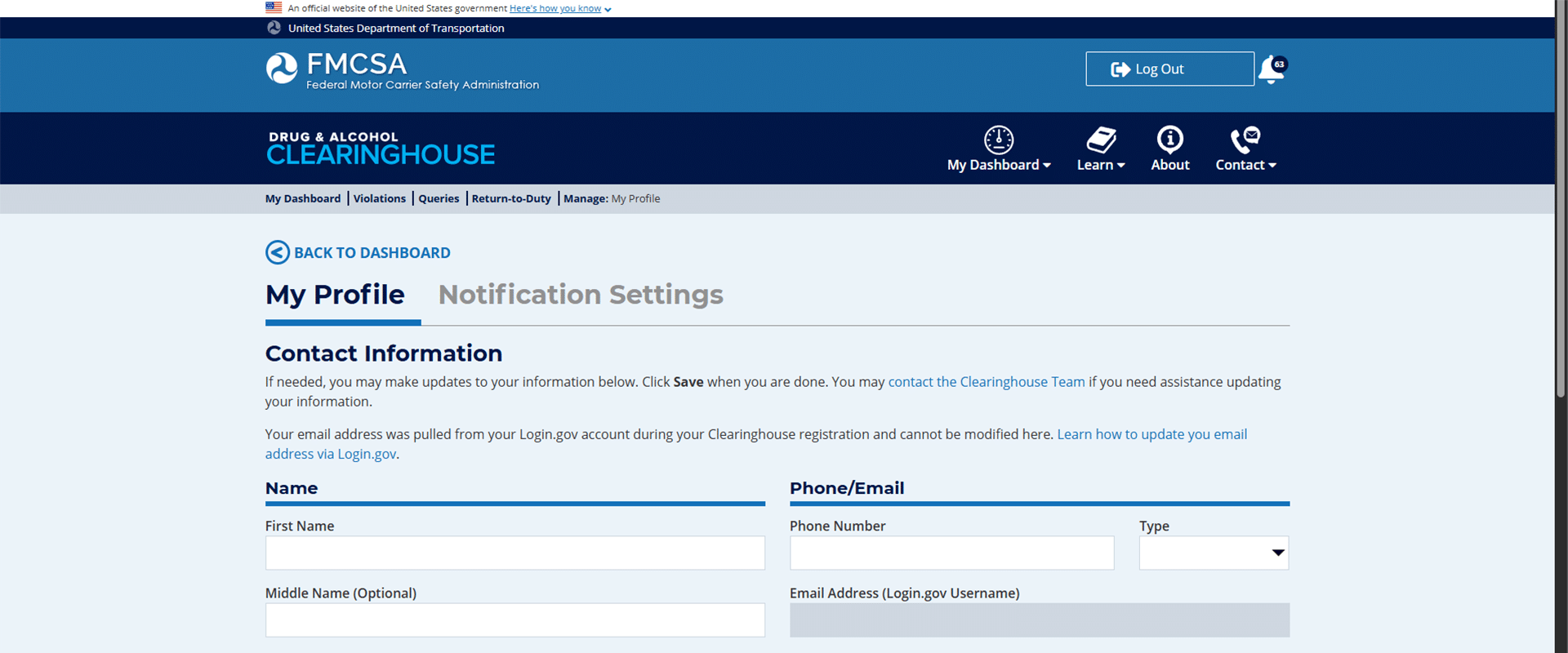
FMCSA Clearinghouse Account Profile with no errors

  1. Re-linking your portal account: If you have previously linked your portal account to your clearinghouse and have not logged in for 90 days, your account may show this.
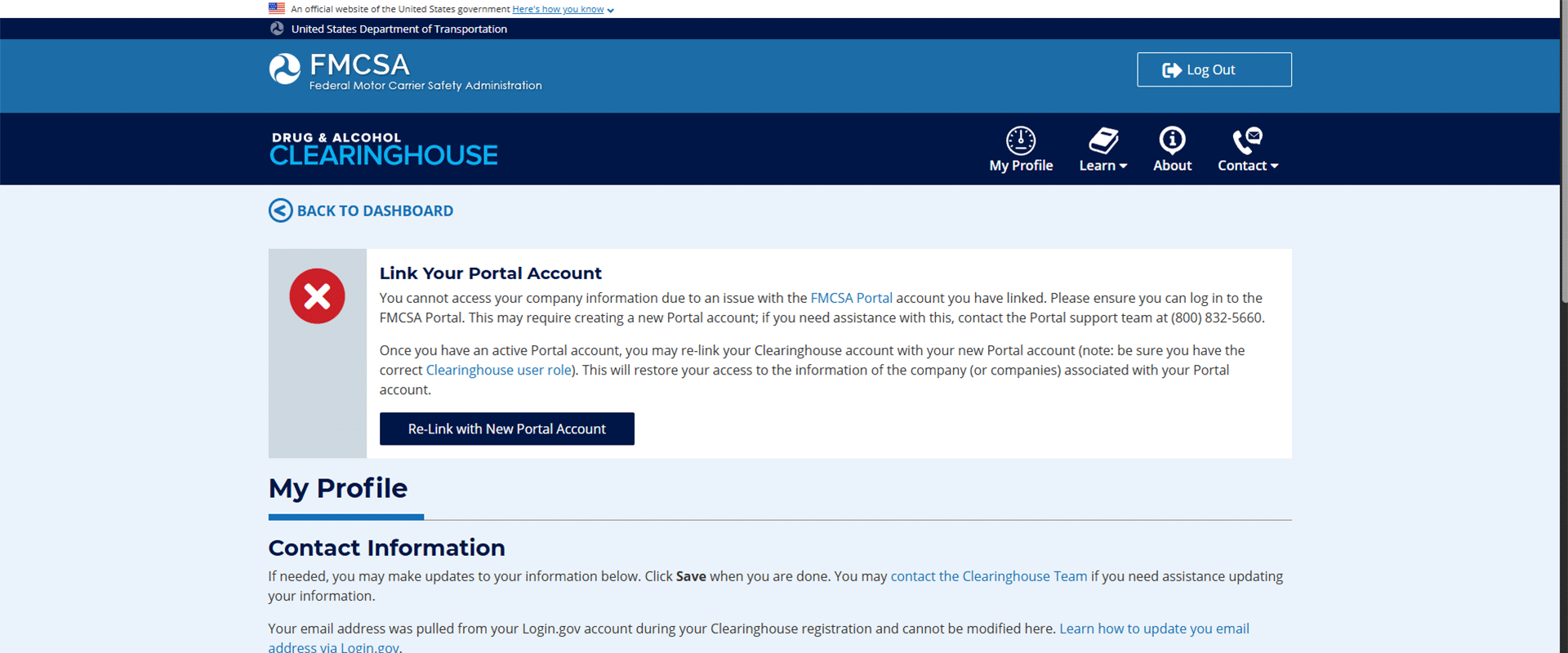
Clearinghouse portal account issue, how to sign up for a motus account

Connecting your Portal Account

  1. Click the link to log into your FMCSA portal account and follow the instructions provided by the FMCSA for re-adding the appropriate portal user role to your profile.

You may need:

    1. USDOT#
    2. Account PIN#
    3. Set-up Security Codes
    4. For further assistance, call the FMCSA at 800-832-5660, or if you are enrolled in our consortium call us today at 417-832-8678.
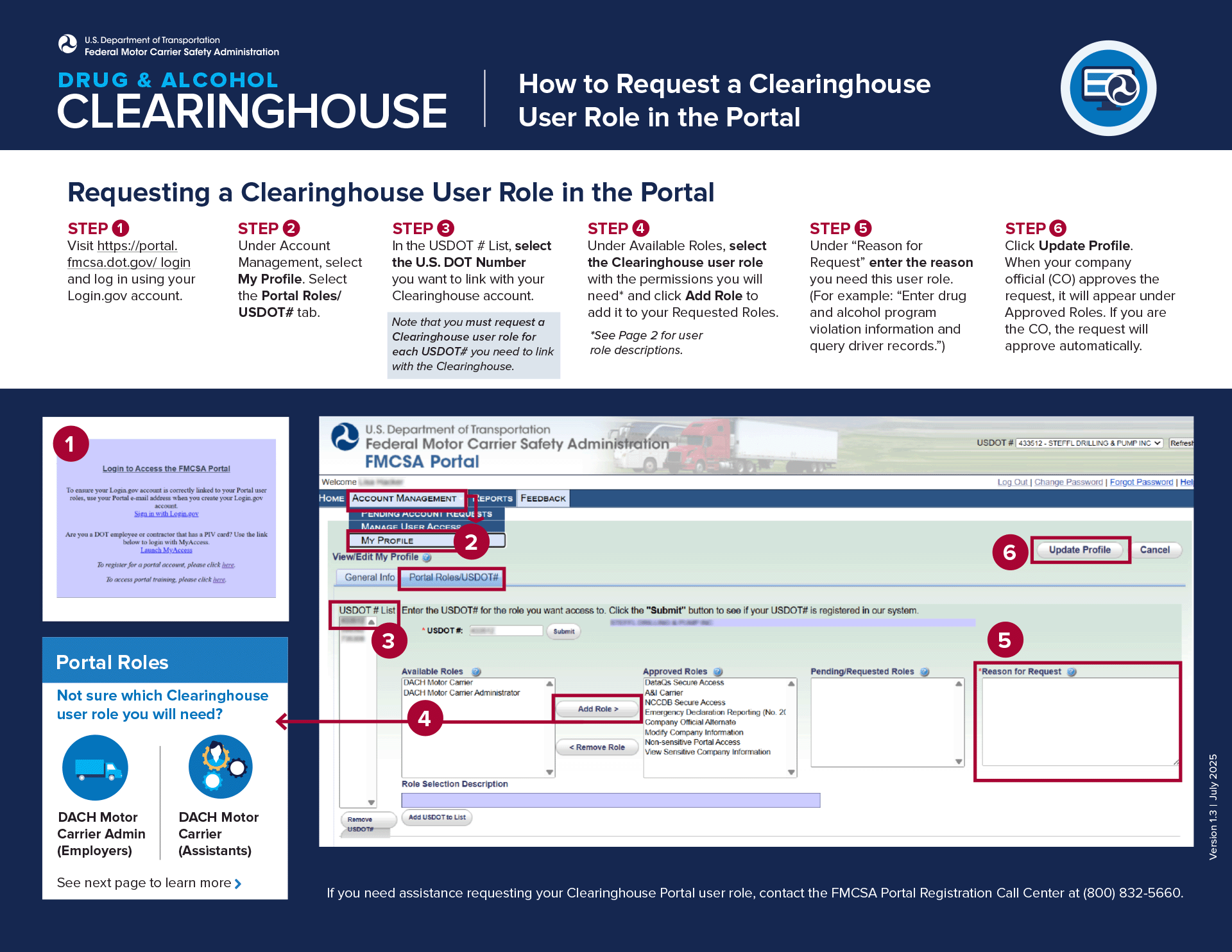
FMCSA Portal account re-link

Motus Registration

  1. Once your Clearinghouse & Portal Account are linked and accessible, navigate to the Motus log-in portal. You may be prompted to log in using the same credentials from your “Log-In.gov” account, do so and proceed.
  2. First, you will be required to complete Identity verification. It is easiest to complete this step with an up-to-date smartphone (some browsers may not be compatible). Have 2 supporting documents handy and be ready to take a photo of yourself. Note that if you fail verification 3 times you will be required to verify in person at a FMCSA Verification Site.
  • The identity verification requires 2 supporting documents, however, we have found that just submitting your driver’s license twice works as well. Make sure you use a dark background with a well-lit area for proper reading.
  • Next you are required to take a photo of yourself (that’s why we recommend a smartphone). Use a well-lit space with a light-colored flat background.
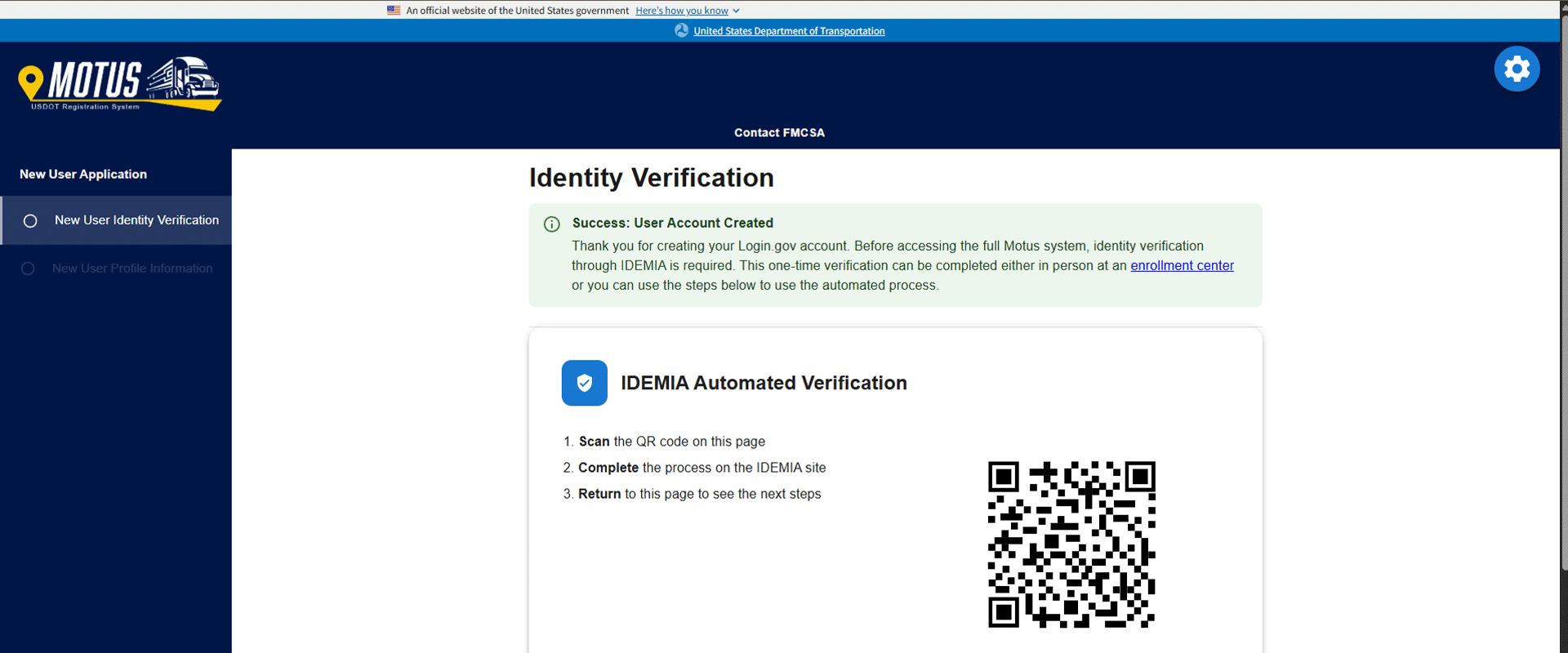
Motus sign up identity verification

  1. After completing verification, you will simply fill out your business information as requested.
  2. Your account is now created. However, you will likely be brought to a screen that has 3 different options. The top option will show “Link your Motus account” or something similar with a button that is greyed out. If this happens to you, you will be required to submit a ticket to the FMCSA for assistance. Navigate to the FMCSA ticket submission.
  • Fill out your information, contact email, First & Last Name, & USDOT#.
  • Inquiry type: select “Other Issue/Question”
  • I need to: select “Ask about a topic not listed”
  • In the Question box you will need to Include – Your USDOT Number – Login.gov email address
  • Attach Documents – Supporting documentation to verify ownership (such as an IRS letter, articles of incorporation, or other proof of State/municipality). Note: If you do not have any supporting documents, contact your Secretary of State for your Articles of Incorporation. Typically, you can receive these documents quickly.
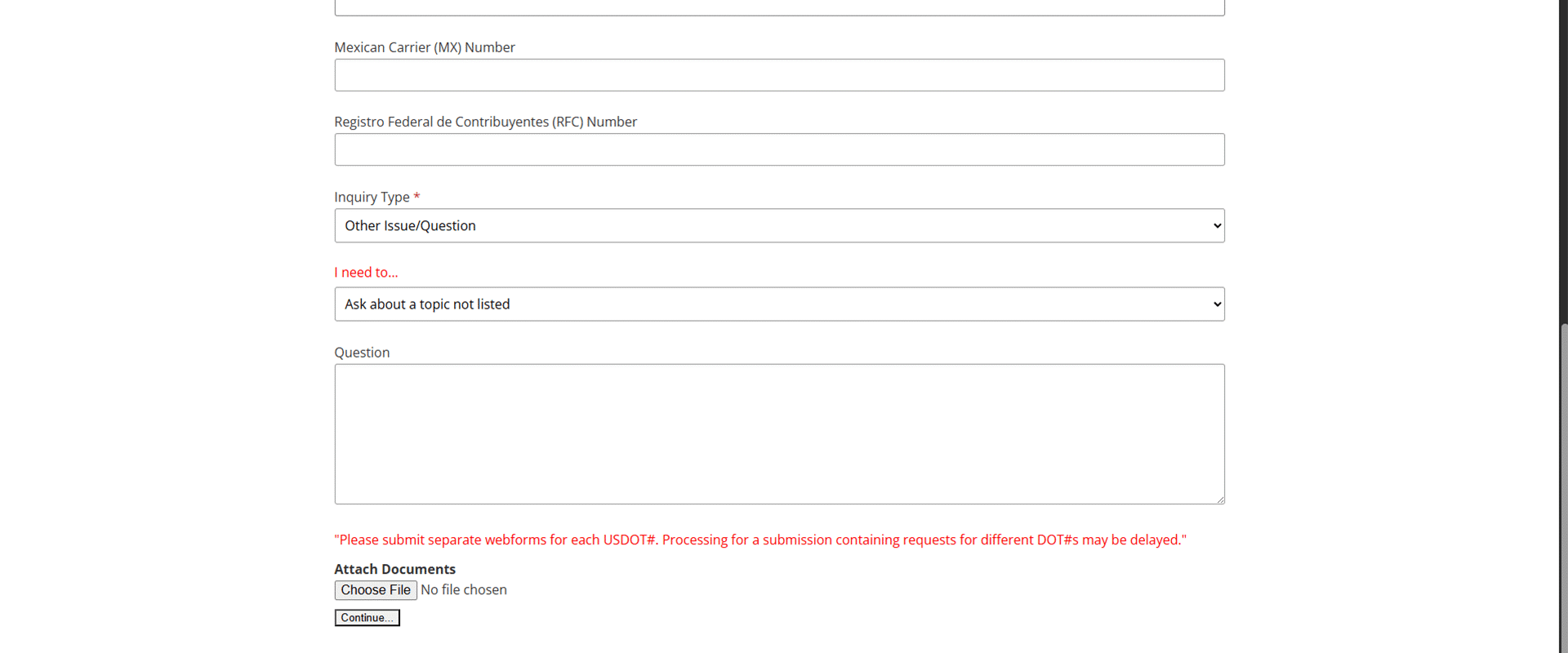
FMCSA Question submission for submitting a ticket

  1. Once you click “Continue” at the bottom, it will submit your ticket, and you should get an email notification within an hour or so. Now you will just have to wait for your Motus account to be linked to your Clearinghouse account by the FMCSA. Depending on the volume of traffic the FMCSA is currently experiencing, determines how long it would take them to make this change for you.


  1. That’s it! Now you have a Motus account.

Further Questions

If you would like assistance with signing up for a Motus account, you must be enrolled in our consortium. Enroll here or by giving us a call at 417-832-8678.

Motus FAQs

What is Motus?

Motus is a modern, secure platform that allows businesses to easily register with the FMCSA, manage registrations, and control authorized access all in one place.

Do I need a Motus account?

If you are a motor carrier that requires a USDOT number or operating authority, then you will be required to sign up for a Motus account.

What if I can’t complete identity verification for Motus?

Motus’s identity verification allows for a maximum of 3 attempts. If you fail all 3 attempts, you will be required to verify your identity in person at an FMCSA verification site.

What happens if I don’t sign up for Motus?

If you do not sign up for Motus, you will lose the ability to manage your USDOT number and authority online. You will need Motus to submit your biennial updates and MCS 150 forms.

Filed Under: Uncategorized

Are DOT-Regulated Positions still Prohibited from THC?

May 18, 2026 By Carter Thomas

Marijuana (THC) has undergone one of the biggest changes for illegal drugs in the past decade in the United States. As of May 2026, there are currently 25 states that have fully legalized THC, 21 with mixed laws, and only 5 states that deem it fully illegal. It is also undergoing a process that will transition it from a schedule 1 drug to a schedule 3 drug. Which begs the question, as a DOT regulated driver, am I still prohibited from consuming THC? Well, as of May 2026, the DOT has just answered that question.

The Short Answer.

Yes, the Department of Transportation still prohibits any DOT regulated employees from consuming any type of THC product (state regulated or not).

Medical Marijuana, is it not just Another Prescription?

Well, what if you get prescribed medical marijuana, can the MRO deem my test negative? No, currently there is no scenario that allows an MRO to verify a laboratory-confirmed marijuana positive drug test result as “negative”. Even if an employee claims the positive was caused by a State licensed marijuana product.

Even after rescheduling, state-dispensed marijuana does not make it an FDA-approved drug. A “legitimate medical explanation” requires use of a legally prescribed controlled substance in compliance with the Federal laws that govern that prescription.

Even if the MRO is presented with a legitimate “Medical Marijuana Card”, physician recommendations or certificates, or dispensary records & receipts, these documents will not satisfy part 40 requirements for a “legitimate medical explanation.”

Are DOT-regulated positions the only ones prohibited from consuming THC?

There are many non-DOT related positions that get tested as much as DOT-regulated positions. Typically, these fall into the safety sensitive category and are commonly tested for THC use. While not all companies are okay with THC use, we have seen a trend in non-DOT companies leaving THC off their drug panels. If you are in a safety sensitive position, or get tested regularly for drugs, we recommend not consuming THC just to be sure.

How long does Marijuana Stay in my System?

If you have recently consumed THC and are looking for new employment which might require a drug test, do you know the detection windows? Unfortunately, it is hard to give precise estimates for detection windows for any drug. There will always be external factors causing variance. Such as age, body weight, metabolism, frequency of use, etc. However, we can approximate based on the average. Typically, THC is detectable in saliva for 24 hours, in urine for 30+ days, and in hair for 90 days.

FAQs About Marijuana Use

Will smoking weed one time show up on a drug test?

Yes, using marijuana even just once will show up on a drug test.

Can inhaling secondhand marijuana smoke make me test positive for THC?

Inhaling secondhand smoke will rarely result in a positive on a drug test. It can introduce THC in your system, but it will likely never meet the standard detection threshold.

Will CBD products cause me to test positive for THC on a drug test?

Like secondhand smoke, consuming CBD introduces trace amounts of THC into your system. However, these trace amounts will likely not meet the detection threshold needed for a positive result.

Can employers still test for weed in legal states?

Yes, any employer reserves the right to enforce a drug free workplace. THC may be legal and decriminalized at the state level; however, it is still illegal at the federal level.


To learn how KT can help your company in the ever-changing workplace, check out our consortium services.

Filed Under: Uncategorized

Visit Us

2032 East Kearney Suite 108
Springfield, MO 65803

phone: (417) 832-8678
email: mail@kthealthclinic.com
fax: (417) 832-8677

Facebook Knowledge Center

Copyright © 2026 • Website Provided by Megaphone Designs