(417) 832-8678 2032 East Kearney Suite 108 Springfield, MO 65803 M-F 8am to 4pm  

KT Health Clinic

Springfield & Southwest Missouri

  • Home
  • DOT
    • Physicals
    • Alcohol
    • Drug
    • Clearinghouse Limited Release
    • Consortium
    • KTHC DOT Consortium Sign up
    • EPASS Request
    • On-Location Testing
    • Drivers List
    • Medical Review Officer
      • Substance Abuse Program
    • Why Us
  • Legal
    • Attorneys
    • What Test Do I Order?
    • Alcohol Testing
    • Paternity/DNA
    • Drug Testing
      • Alcohol Testing
  • DNA
    • Learn More
    • Personalized Medicine DNA
    • Infidelity DNA
    • Relationship DNA
    • Paternity/Maternity
  • SAP
  • Blog
  • Contact Us

Blog

How to Sign up for a MOTUS Account

June 25, 2026 By Carter Thomas

In this guide we will explain a step-by-step overview of how to sign up for a Motus account and provide resources for troubleshooting along the way.

What is Motus?

Motus in a nutshell is a replacement for the FMCSA Portal. Motus is a modern, secure platform that allows businesses to easily register with the FMCSA. On top of that, employers previously had to submit their MCS 150 Forms & do their Biennial Updates through mail, but now employers can use Motus to submit these forms. If you want a more detailed look at what Motus is, refer to the FMCSA’s Motus Guide.

How to Sign up for a Motus Account (Step-by-step)

The guide below was last updated June 25th, 2026. If anything appears to have changed in this process feel free to email us at ktheathclinic@kthealthclinic.com.

Have your Clearinghouse and FMCSA Portal Account Accessible

  1. Log into your clearinghouse account and navigate to your Clearinghouse profile.
  1. Ensure your account has zero errors listed under your profile. If your account is connected to your portal account correctly skip to step 5.
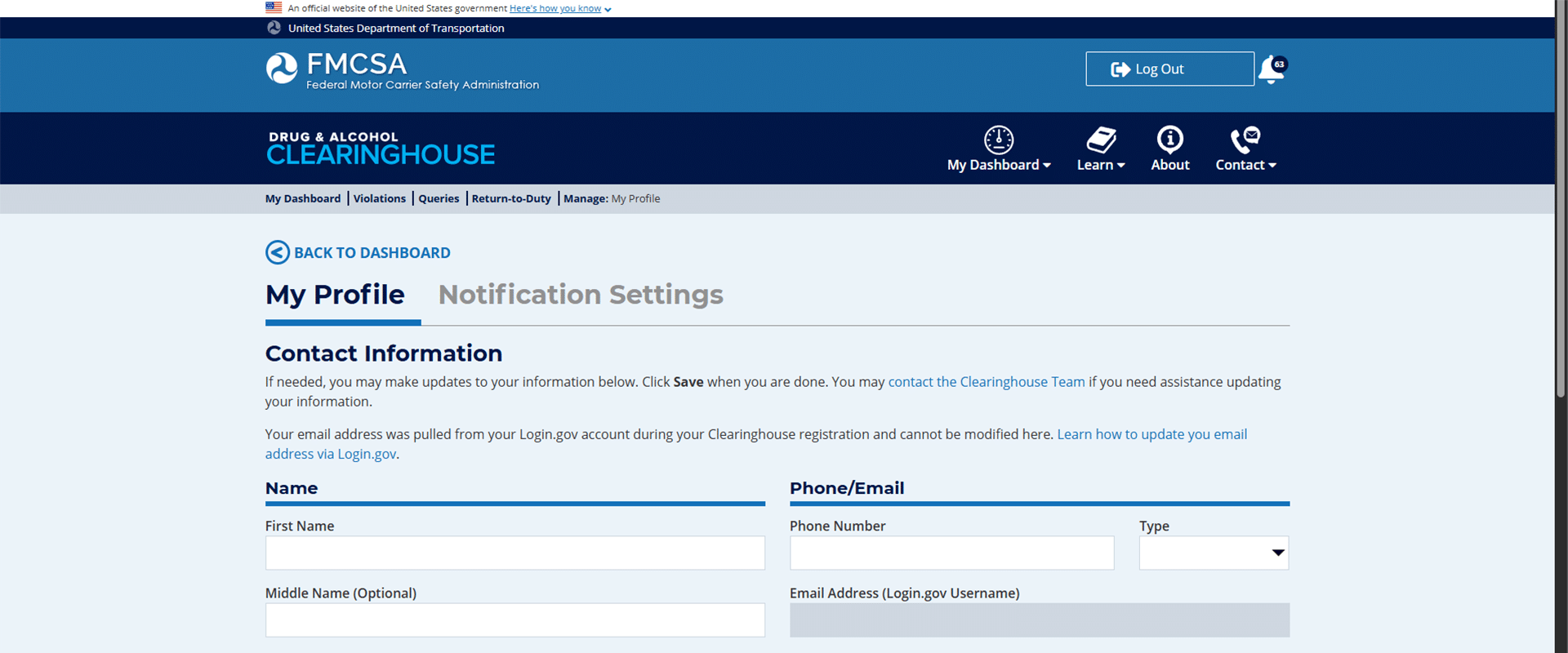
FMCSA Clearinghouse Account Profile with no errors

  1. Re-linking your portal account: If you have previously linked your portal account to your clearinghouse and have not logged in for 90 days, your account may show this.
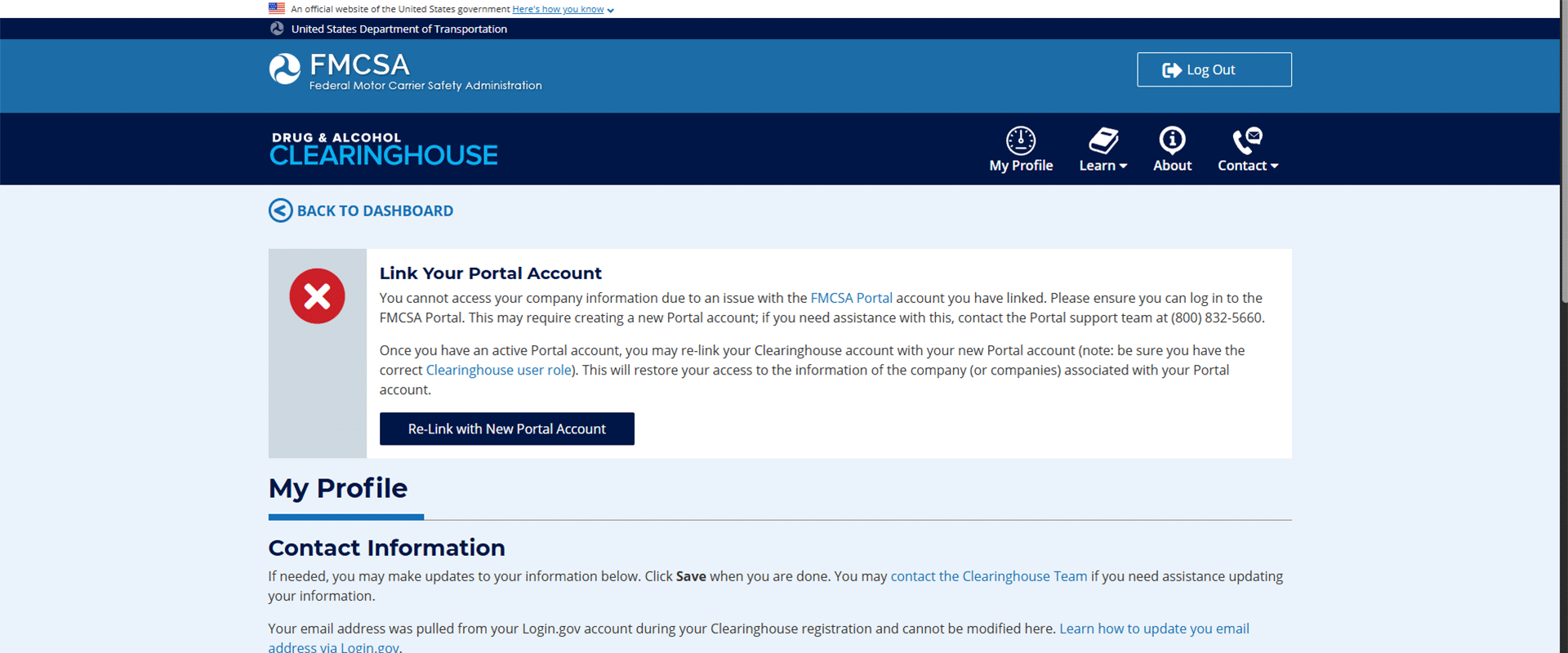
Clearinghouse portal account issue, how to sign up for a motus account

Connecting your Portal Account

  1. Click the link to log into your FMCSA portal account and follow the instructions provided by the FMCSA for re-adding the appropriate portal user role to your profile.

You may need:

    1. USDOT#
    2. Account PIN#
    3. Set-up Security Codes
    4. For further assistance, call the FMCSA at 800-832-5660, or if you are enrolled in our consortium call us today at 417-832-8678.
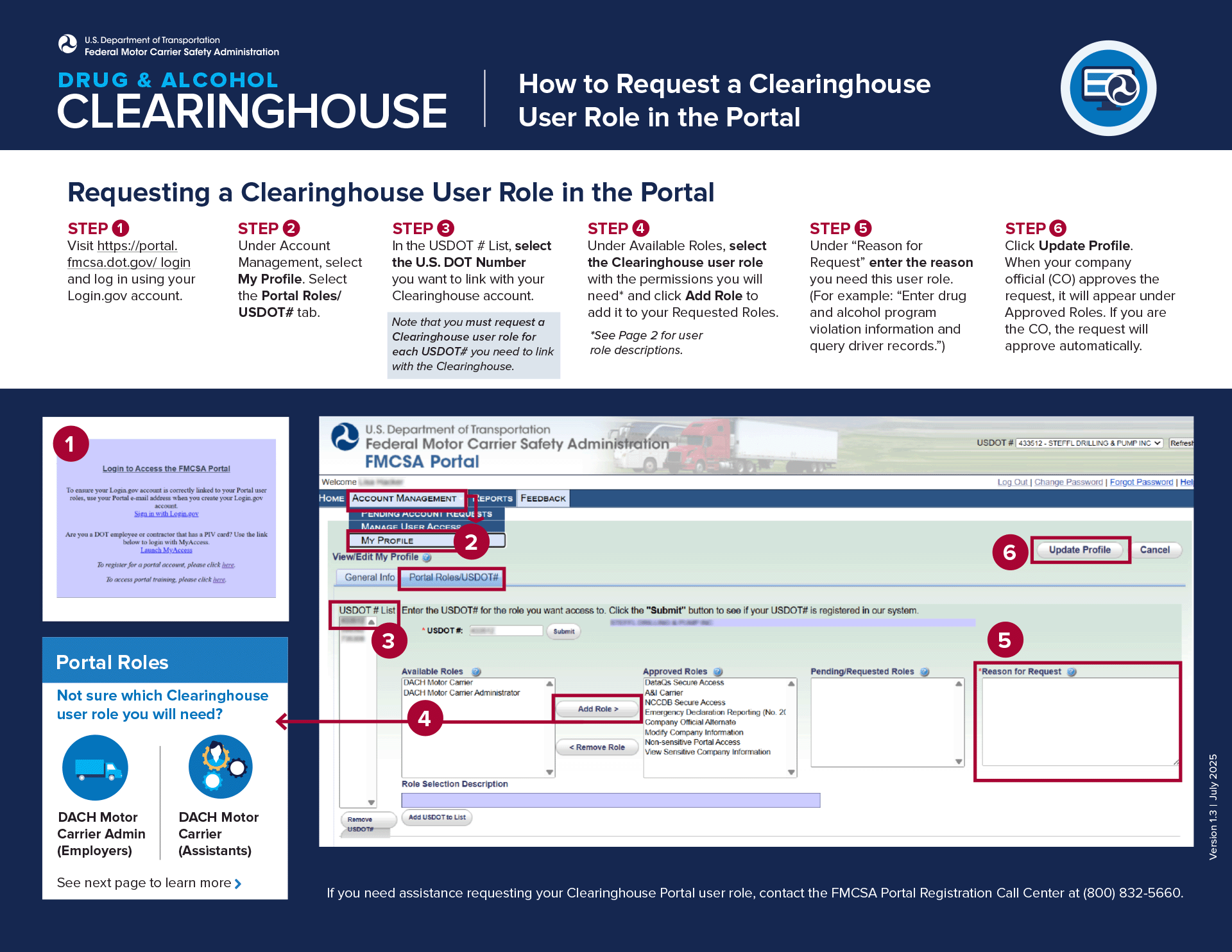
FMCSA Portal account re-link

Motus Registration

  1. Once your Clearinghouse & Portal Account are linked and accessible, navigate to the Motus log-in portal. You may be prompted to log in using the same credentials from your “Log-In.gov” account, do so and proceed.
  2. First, you will be required to complete Identity verification. It is easiest to complete this step with an up-to-date smartphone (some browsers may not be compatible). Have 2 supporting documents handy and be ready to take a photo of yourself. Note that if you fail verification 3 times you will be required to verify in person at a FMCSA Verification Site.
  • The identity verification requires 2 supporting documents, however, we have found that just submitting your driver’s license twice works as well. Make sure you use a dark background with a well-lit area for proper reading.
  • Next you are required to take a photo of yourself (that’s why we recommend a smartphone). Use a well-lit space with a light-colored flat background.
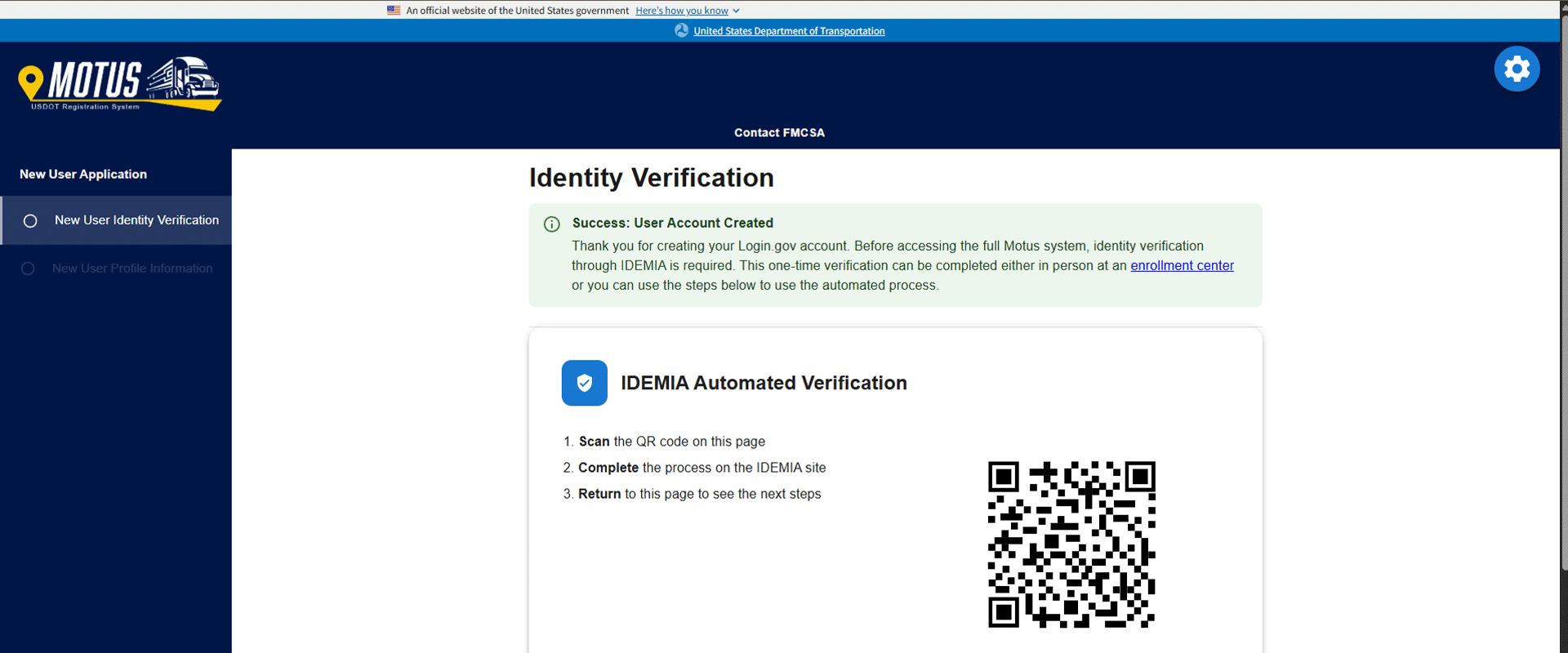
Motus sign up identity verification

  1. After completing verification, you will simply fill out your business information as requested.
  2. Your account is now created. However, you will likely be brought to a screen that has 3 different options. The top option will show “Link your Motus account” or something similar with a button that is greyed out. If this happens to you, you will be required to submit a ticket to the FMCSA for assistance. Navigate to the FMCSA ticket submission.
  • Fill out your information, contact email, First & Last Name, & USDOT#.
  • Inquiry type: select “Other Issue/Question”
  • I need to: select “Ask about a topic not listed”
  • In the Question box you will need to Include – Your USDOT Number – Login.gov email address
  • Attach Documents – Supporting documentation to verify ownership (such as an IRS letter, articles of incorporation, or other proof of State/municipality). Note: If you do not have any supporting documents, contact your Secretary of State for your Articles of Incorporation. Typically, you can receive these documents quickly.
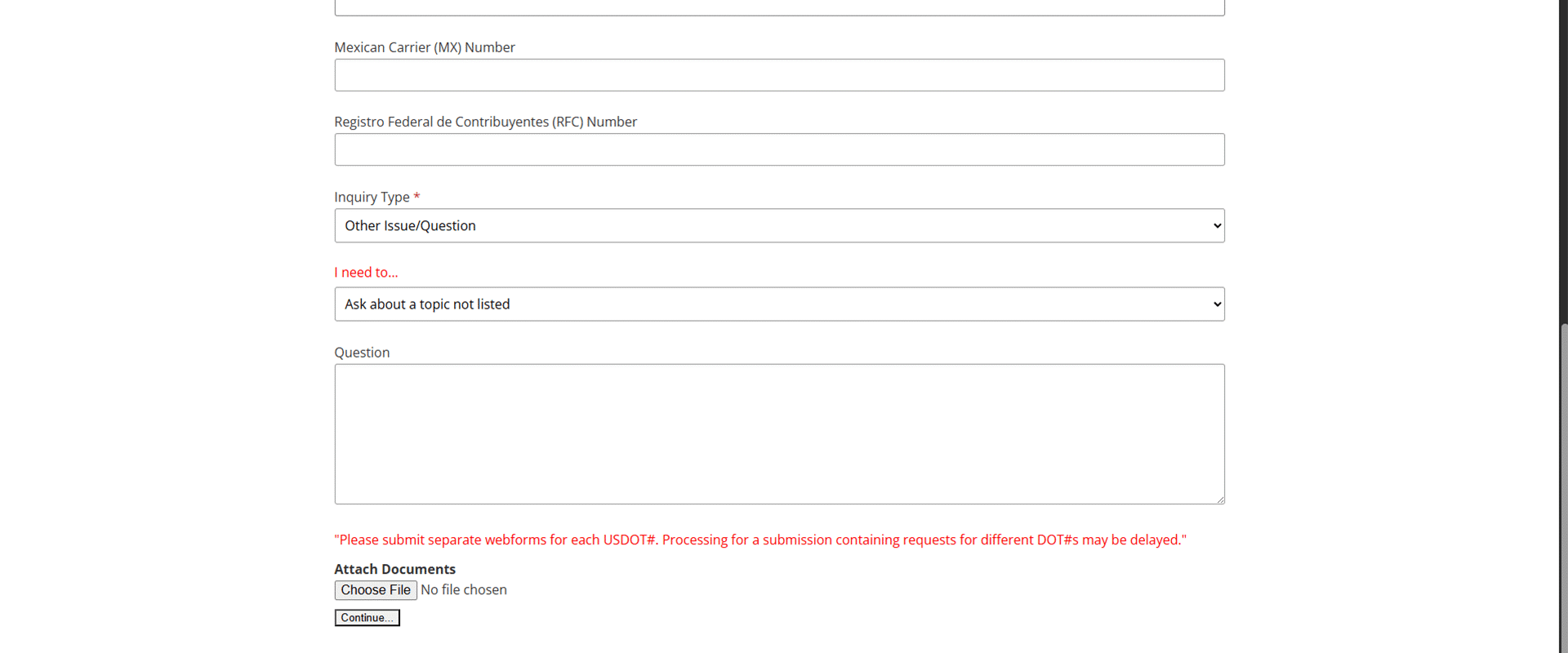
FMCSA Question submission for submitting a ticket

  1. Once you click “Continue” at the bottom, it will submit your ticket, and you should get an email notification within an hour or so. Now you will just have to wait for your Motus account to be linked to your Clearinghouse account by the FMCSA. Depending on the volume of traffic the FMCSA is currently experiencing, determines how long it would take them to make this change for you.


  1. That’s it! Now you have a Motus account.

Further Questions

If you would like assistance with signing up for a Motus account, you must be enrolled in our consortium. Enroll here or by giving us a call at 417-832-8678.

Motus FAQs

What is Motus?

Motus is a modern, secure platform that allows businesses to easily register with the FMCSA, manage registrations, and control authorized access all in one place.

Do I need a Motus account?

If you are a motor carrier that requires a USDOT number or operating authority, then you will be required to sign up for a Motus account.

What if I can’t complete identity verification for Motus?

Motus’s identity verification allows for a maximum of 3 attempts. If you fail all 3 attempts, you will be required to verify your identity in person at an FMCSA verification site.

What happens if I don’t sign up for Motus?

If you do not sign up for Motus, you will lose the ability to manage your USDOT number and authority online. You will need Motus to submit your biennial updates and MCS 150 forms.

Filed Under: Uncategorized

Are DOT-Regulated Positions still Prohibited from THC?

May 18, 2026 By Carter Thomas

Marijuana (THC) has undergone one of the biggest changes for illegal drugs in the past decade in the United States. As of May 2026, there are currently 25 states that have fully legalized THC, 21 with mixed laws, and only 5 states that deem it fully illegal. It is also undergoing a process that will transition it from a schedule 1 drug to a schedule 3 drug. Which begs the question, as a DOT regulated driver, am I still prohibited from consuming THC? Well, as of May 2026, the DOT has just answered that question.

The Short Answer.

Yes, the Department of Transportation still prohibits any DOT regulated employees from consuming any type of THC product (state regulated or not).

Medical Marijuana, is it not just Another Prescription?

Well, what if you get prescribed medical marijuana, can the MRO deem my test negative? No, currently there is no scenario that allows an MRO to verify a laboratory-confirmed marijuana positive drug test result as “negative”. Even if an employee claims the positive was caused by a State licensed marijuana product.

Even after rescheduling, state-dispensed marijuana does not make it an FDA-approved drug. A “legitimate medical explanation” requires use of a legally prescribed controlled substance in compliance with the Federal laws that govern that prescription.

Even if the MRO is presented with a legitimate “Medical Marijuana Card”, physician recommendations or certificates, or dispensary records & receipts, these documents will not satisfy part 40 requirements for a “legitimate medical explanation.”

Are DOT-regulated positions the only ones prohibited from consuming THC?

There are many non-DOT related positions that get tested as much as DOT-regulated positions. Typically, these fall into the safety sensitive category and are commonly tested for THC use. While not all companies are okay with THC use, we have seen a trend in non-DOT companies leaving THC off their drug panels. If you are in a safety sensitive position, or get tested regularly for drugs, we recommend not consuming THC just to be sure.

How long does Marijuana Stay in my System?

If you have recently consumed THC and are looking for new employment which might require a drug test, do you know the detection windows? Unfortunately, it is hard to give precise estimates for detection windows for any drug. There will always be external factors causing variance. Such as age, body weight, metabolism, frequency of use, etc. However, we can approximate based on the average. Typically, THC is detectable in saliva for 24 hours, in urine for 30+ days, and in hair for 90 days.

FAQs About Marijuana Use

Will smoking weed one time show up on a drug test?

Yes, using marijuana even just once will show up on a drug test.

Can inhaling secondhand marijuana smoke make me test positive for THC?

Inhaling secondhand smoke will rarely result in a positive on a drug test. It can introduce THC in your system, but it will likely never meet the standard detection threshold.

Will CBD products cause me to test positive for THC on a drug test?

Like secondhand smoke, consuming CBD introduces trace amounts of THC into your system. However, these trace amounts will likely not meet the detection threshold needed for a positive result.

Can employers still test for weed in legal states?

Yes, any employer reserves the right to enforce a drug free workplace. THC may be legal and decriminalized at the state level; however, it is still illegal at the federal level.


To learn how KT can help your company in the ever-changing workplace, check out our consortium services.

Filed Under: Uncategorized

New Vision Regulation Standards

August 17, 2022 By Dr. Alexander E. Underwood

by Dr. Alexander Underwood MD, AP, CME

Obviously, being able to see effectively is an important part of driving a commercial vehicle.  The Federal Motor Carrier Safety Administration (FMCSA) has always had legal standards when it came to vision requirements.  Unlike other parts of the DOT medical exam, vision standards are regulatory, not guidance based.  This means that there is no interpretation left to the medical examiners, specific standards on visual acuity, field of vision, colorblindness, etc must be met in order for a medical certificate to be issued.  Previously a driver that was not able to meet the vision standards must apply for a federal exemption.  This involved completing a significant amount of medical paperwork, visiting various eye doctors and submitting a packet to the federal government in the hopes of obtaining an exemption.  During this long waiting time, the driver’s medical certificate would be incomplete and the driver would not be permitted to start or continue driving.

Thankfully, DOT and FMCSA realized this federal vision exemption practice was burdensome and did not increase overall road safety.  In January of 2022, the FMCSA announced there would be a streamlining of the medical certification process for those with visual defects.  Instead of completing an initial DOT physical and then waiting on the Federal government to issue an exemption, the process would not require any involvement of an exemption, it would be handled by the driver, his eye doctor and the medical examiner, with some exceptions.  The process was finalized in March of 2022. It is as follows:

  1. A driver who has monocular vision or does not meet the field of vision standard in one eye must have a vision evaluation by an ophthalmologist or optometrist.
  2. The ophthalmologist or optometrist completes the new Vision Evaluation Report, Form MCSA-5871 (available on FMCSA website).
  3. The driver then presents to the medical examiner for a standard DOT medical exam with a completed MCSA-5871.
  4. If the driver is deemed medically fit, they will be issued a new medical card MCSA 5876
  5. In most cases (with specific exceptions) the driver then must satisfactorily complete a road test put forth by his employer.

To note, this new alternative vision standard is not to be used with those who cannot distinguish between red, green and yellow traffic lights.  Various levels of colorblindness exist, but those who are totally unable to distinguish these colors cannot be certified.  This new alternative vision standard is to be used ONLY in cases of monocular vision (one eye), decreased field of vision, and decreased visual acuity.  The medical examiner is not responsible for the road test , the employer is.  No marks or exemptions will be checked on the new medical certificate as was the case with a vision exemption.

Filed Under: Uncategorized

KT Health Clinic announces the addition of Rob Schweighardt as Director of Safety and Compliance

June 13, 2022 By MegaAdmin

It is with great excitement that KT Health Clinic announces the hiring of Rob Schweighardt to lead our new Safety and Compliance Department for KT Health Clinic.  Rob comes to KT Health Clinic with a significant background in Safety, Compliance and Law Enforcement.  You may know Rob from his time at the Permit Shop here in Springfield, MO.  Prior to serving as a DOT Safety Consultant for five years, Rob retired after a 25-year career in state and federal law enforcement, as a presentence investigator in Missouri and a field officer along the Mexico/Arizona border.  Scott Thomas, GM & Owner of KT Health Clinic said, “Rob is the perfect person to lead our safety and compliance efforts for all our Consortium Members and partnering clients.  With the addition of Safety and Compliance consulting lead by Rob, KT Health Clinic can offer a comprehensive level of service not equaled by anyone in SW Missouri…from drug screens to the audit and everything in between that the DOT requires, we can help you stay compliant and your wheels turning!”


KT Health Clinic & Compliance is your full-service DOT partner.  If you have a safety or compliance need, or just want to welcome Rob to the KT Health Clinic family, give us a call.

For more information on the following safety and compliance services, call and ask for Rob at 417-832-8678 or email him at rob@kthealthclinic.com


  • Drug & Alcohol Clearinghouse registration issues.
  • DataQ (challenge data issued by FMCSA that you believe to be inaccurate.)
  • New Entrant Safety Audits (We’ll serve as the “go between” you and the investigator.)
  • Monitoring Safety Measurement System scores (SMS/CSA) (Helps you keep track of roadside inspections, violations, and BASIC scores. Regular review helps you to be aware of inspections/accidents falsely attributed to your company.)
  • Official DOT Notifications for submitting drug and alcohol testing results.
  • Questions; if we don’t have the answer, we will hunt the answer down for you.

Coming:

  • Driver Qualification Files (We’ll help you build them and maintain them.)
  • MVR pulls.
  • Pre-employment Screening Program (PSP – gives employers a 5-year accident history and a 3-year roadside inspection history.)
  • Auditing (We will audit your drivers’ files for FMCSA compliance.)
  • Background checks.
  • In some cases, we may be able to assist you with getting your status upgraded if you have a conditional rating.

Filed Under: Uncategorized

KT Health Clinic is now offering COVID-19 Antibody Testing

June 4, 2020 By MegaAdmin

Get Peace of Mind with Covid-19: Immune Response testing from KT Health Clinic


What does the Test tell you?

COVID-19 immune response tests indicate the presence of novel coronavirus antibodies in the blood from a previous exposure, even if you did not have COVID-19 symptoms.

[Read more…]

Filed Under: Uncategorized

  • 1
  • 2
  • 3
  • Next Page »

Visit Us

2032 East Kearney Suite 108
Springfield, MO 65803

phone: (417) 832-8678
email: mail@kthealthclinic.com
fax: (417) 832-8677

Facebook Knowledge Center

Copyright © 2026 • Website Provided by Megaphone Designs